Printing Cards and Tattoos
Step-by-step directions for printing AlphaGalData cards and temporary tattoos at home or through a print service.
Printing support
Use this page after you know which preparedness tool you want to carry. It explains how to print and stage wallet cards, dining cards, and tattoo files, but it does not replace the guidance on when or why to use each tool.
Use these instructions to print durable wallet cards, dining cards, and temporary medical alert tattoos. You can print at home or send the files to a local or online print service.
Start with the right tool
- Use the wallet card guide when you need a compact clinical summary for intake and travel.
- Use the medical alert tattoo guide when you are planning for situations where emergency staff may need to see the restriction before anyone can explain it.
- Use the downloads page for the full public resource library and related preparedness files.
Gather supplies
- Heavy 80 lb cover stock or pre-scored business card paper for the wallet card.
- 4x6 inch index cards or photo paper for the dining card.
- A sharp paper trimmer or scissors, plus laminating sleeves if you want extra durability.
Print at home
- Download the PDFs below so you can print the original resolution files.
- Set your printer to landscape orientation and 100% scale (no fit-to-page).
- Print a test sheet on plain paper to check alignment before moving to heavier stock.
- Trim along the guides, fold the wallet card, and laminate if desired.
Send to a print service
- Share the PDF with your provider. Mention that the wallet card should stay true credit-card size and the dining card should remain 4x6 inches.
- Ask for matte or satin finishes so you can write on the back.
- Request a few spares so you can stage cards in travel bags and vehicles.
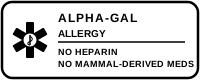
Wallet card preview
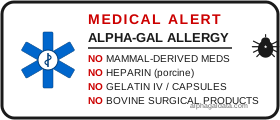
Dining card preview
Print temporary tattoos at home
- Purchase inkjet temporary tattoo paper (available on Amazon, typically under $10 for 5-10 sheets).
- Download the wrist tattoo SVG or full tattoo SVG.
- Open the SVG in any image editor or browser, print at 100% scale on the tattoo paper.
- Follow the tattoo paper instructions: cut out the design, apply to clean dry skin with a damp cloth, hold for 30 seconds.
- The tattoo lasts 2-5 days. Apply to the inner wrist where EMTs check for medical alerts.
Order professional temporary tattoos
For higher quality and bulk orders, upload the SVG to a custom tattoo service:
- Sticker Mule — high quality, ships US/Canada/Mexico
- StickerYou — flexible small-run orders
- EasyTatt — long-lasting (3-7 days), free image touch-ups
- Inkbox — semi-permanent option lasting 2+ weeks
See all partner links on our downloads page.
Store digital copies of all cards and tattoo files in a shared family folder so someone else can reprint if you lose yours. Include a note about the date you last updated medications. Read the full medical alert tattoo guide for placement and pairing advice.
This page is educational only and not medical advice.